

A desk that stays organized past the first week needs a system where putting things back takes less effort than leaving them out.
That means fixed spots for supplies, a triage point for paper the moment it lands, and a working surface that holds 10 items maximum—the number that resets in five minutes instead of an hour.
The average office worker spends 1.5 hours daily searching for misplaced items, and most of that time vanishes because categories like pens, cables, and action files never got a designated home.
1. Clear the Desk and Remove What You Do Not Need
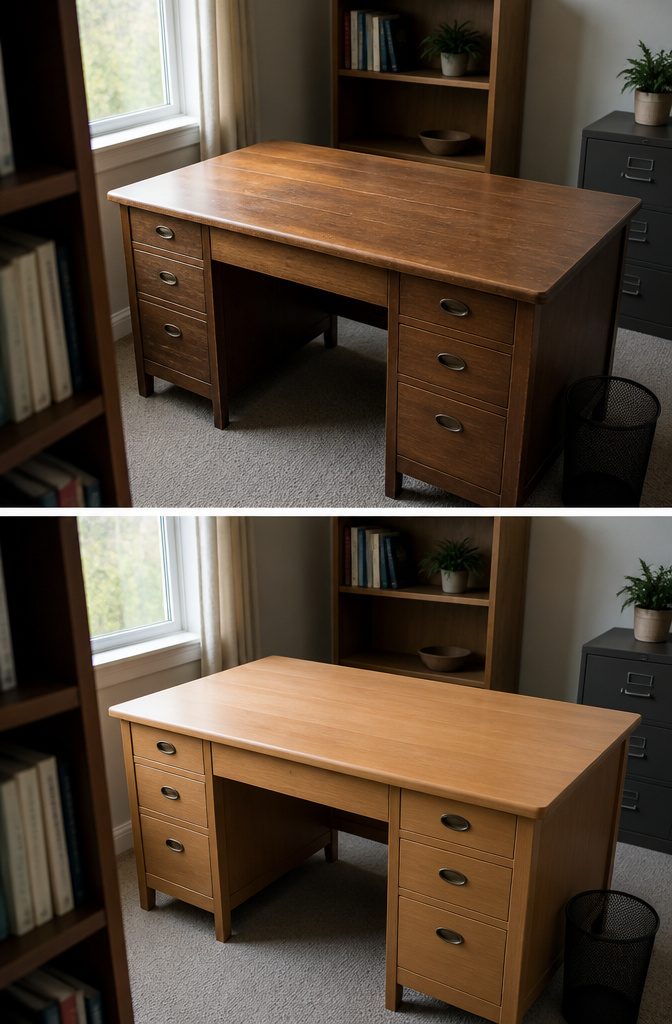
I start by pulling everything off the desk — the pens, the cables, the coffee mug that has been there since Tuesday, the mail, the notebooks, all of it. Unplug what is plugged in and move cords to the side.
Clear the drawers and shelves too if the desk has them. The surface needs to be completely empty before anything goes back.
Then I sort into three piles: stays on the desk, belongs elsewhere, and trash.
The "stays" pile should be small. Only items I touch at least once a day earn a spot on the surface.
The "elsewhere" pile goes to its actual home — the bookshelf, the filing cabinet, the kitchen. The trash pile will surprise you.
When I can’t decide which pile something belongs in within 90 seconds, it goes in the "elsewhere" pile. I can always bring it back.
Most things I hesitate about don’t come back. Items unused for a few months can likely be discarded.
2. Give Items Designated Homes and Group Similar Supplies
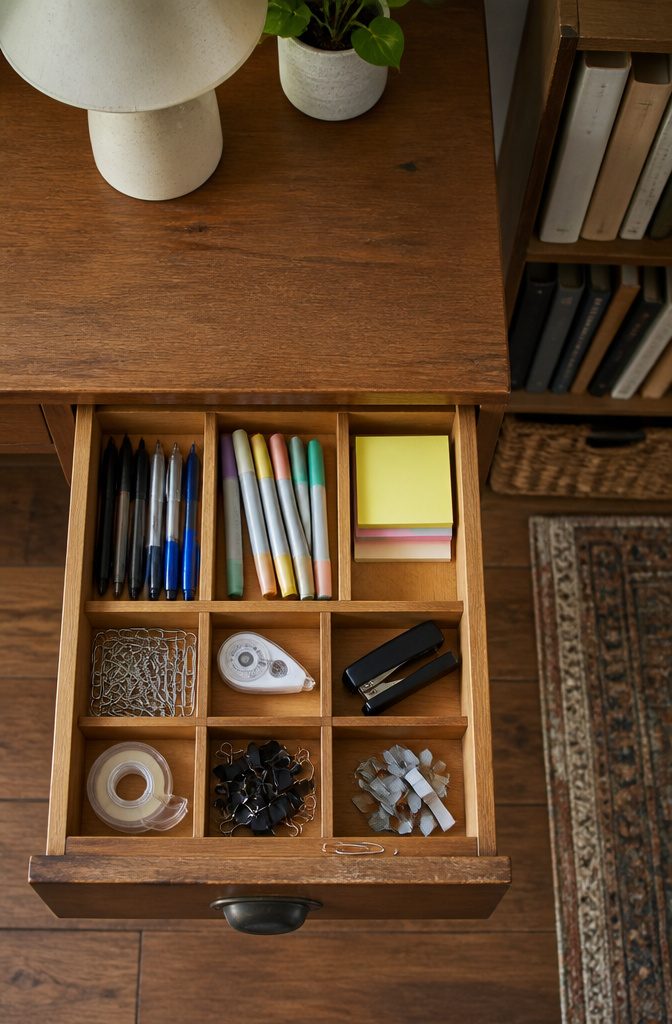
Grouping supplies by type keeps the desk from becoming a holding area where everything eventually lands.
Pens, markers, sticky notes, paper clips, whiteout and staples each get a consistent spot, so returning an item takes no thought and finding it later takes no time.
I assign one drawer or tray section per category rather than mixing them, because a stapler buried under loose pens means digging when I should already be working.
Related items sit together: all tape in one bin, all clips in another. That grouping shows at a glance when something is running low, and it shortens the path between needing the thing and using it.
A divided drawer or a set of small containers does the job; the dividers matter more than the organizer itself. When each supply knows where it lives, clutter stops building and the desk stays functional past the first clean sweep.
3. Organize Drawers with Dividers, Trays, or Containers
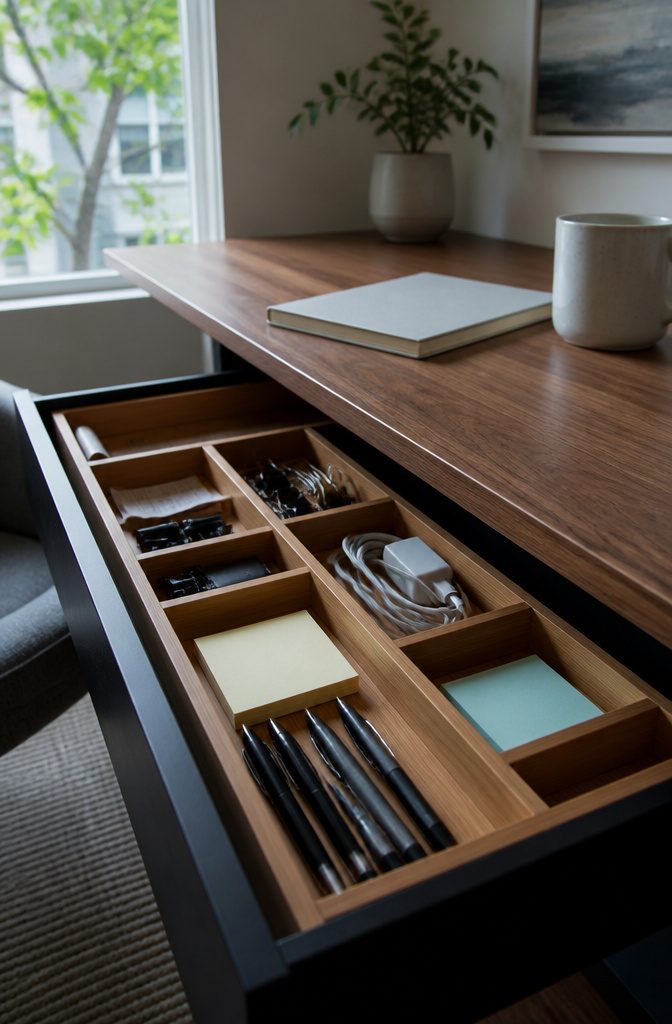
Small supplies multiply fast in a desk drawer. Pens, clips, sticky notes, charging cables and receipt stubs pile on top of each other until pulling out the one thing you need means digging through the whole mess.
Dividers and trays stop that from happening by giving each category a fixed compartment it has to stay in.
The Marbrasse Bamboo Expandable Drawer Organizer fits most desk drawers and adjusts to the width you have, with 10 compartments that can be repositioned as the contents shift.
I find bamboo holds up better than plastic trays that crack at the corners after a year of opening and closing.
Less-used items go toward the back, everyday supplies stay in the front slots where a hand finds them without looking.
Labels make it easier to put things back where they belong, especially in shared workspaces.
The Brother P-Touch PTD220 label maker prints adhesive strips that stick to drawer fronts or tray dividers and survive the humidity and handling better than handwritten masking tape.
4. Set Up a Filing System and Contain Paperwork
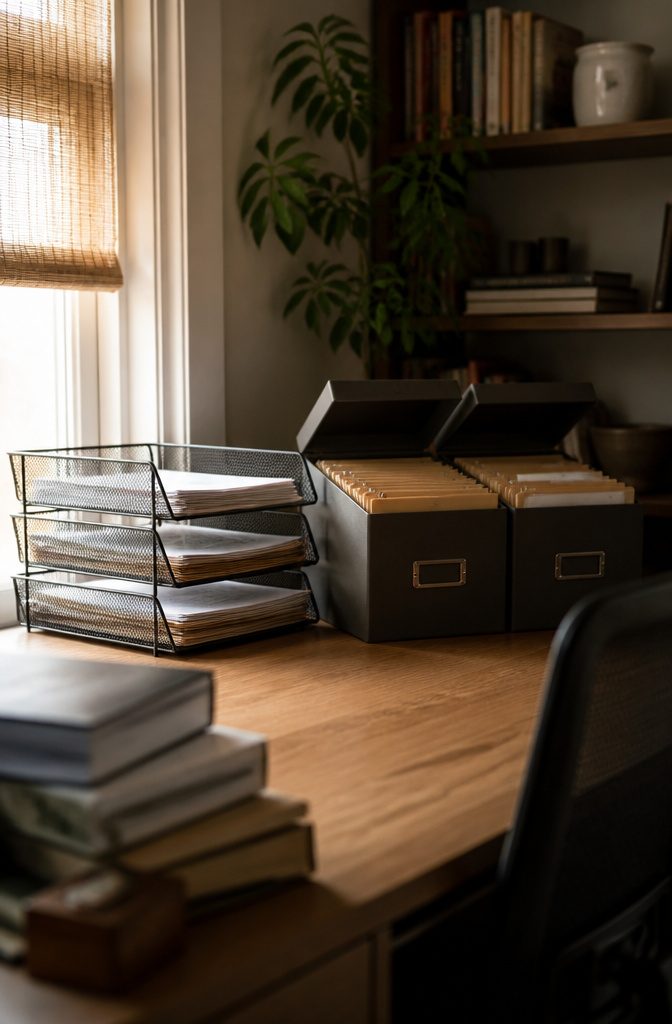
Papers land on the desk and stay there because there’s no system to move them anywhere else. Three trays — Action, Reference, and Out — give every piece a place the moment it arrives.
Action holds what needs a response this week. Reference is for documents you might need but not today.
Out means done: ready to scan, file, or recycle. The rule is one-touch.
Pick it up, decide which tray, drop it in. No dealing with it later.
If three mesh trays don’t fit the budget, three manila folders stood upright in a bookend do the same work for almost nothing.
Another setup that works is one tray for incoming and another for outgoing, reviewed weekly to keep the stack from growing into storage.
Filing boxes handle the long-term side.
I like one for work and one for personal, each with labeled folders inside. The work box holds client files, business receipts, and contracts.
The personal box gets a file for each family member and monthly receipt folders. Keep the lids off so papers drop in fast at the end of the day.
5. Use Vertical and Wall Storage
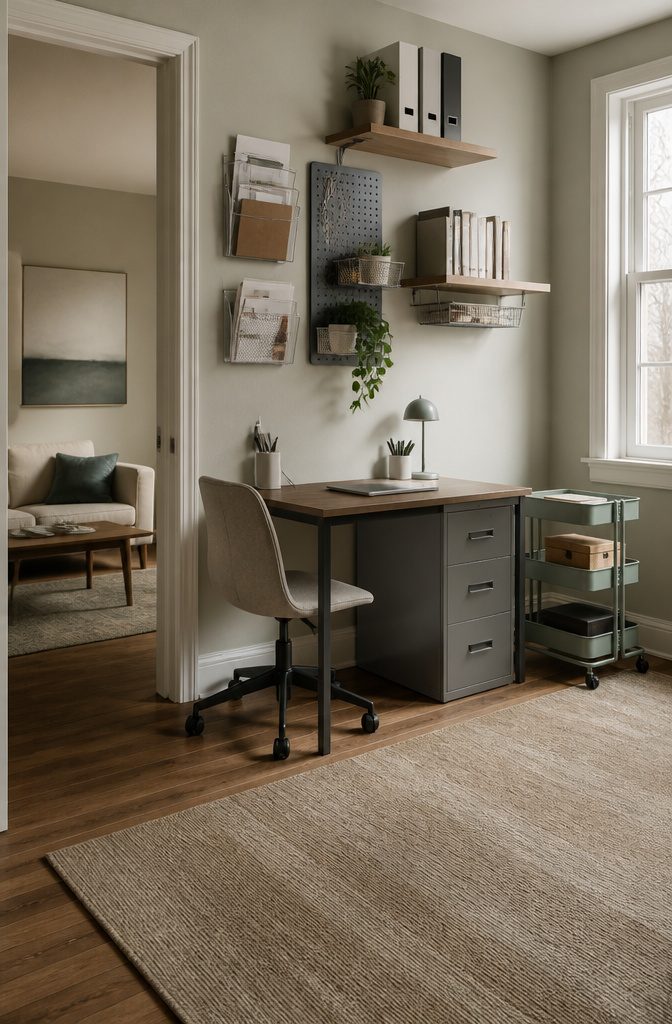
Moving supplies off the desk and onto the walls gives you back the horizontal space where you actually work. Wall-mounted file holders, pegboards, and floating shelves keep the things you need within arm’s reach but out of the way.
A clear acrylic hanging pocket works for documents you check often, and a small shelf handles books or reference binders without eating up desk real estate.
Under-shelf baskets attach to an existing shelf above the desk and hang down to hold supplies you want close but not visible.
They make use of space that would otherwise just sit empty. If drawer space is tight, a rolling cart tucked beside the desk stores overflow and moves when you need it elsewhere.
Wall cabinets go further if you have files, binders, or printer paper that would otherwise pile up.
You can add Command hooks to the sides of the cabinet for bags or headphones, and the top surface holds anything that does not fit inside.
Pegboards let you rearrange hooks and baskets as your needs shift, which beats drilling new holes every time you add a tool or swap out a project.
6. Reduce Paper by Scanning or Using Digital Tools
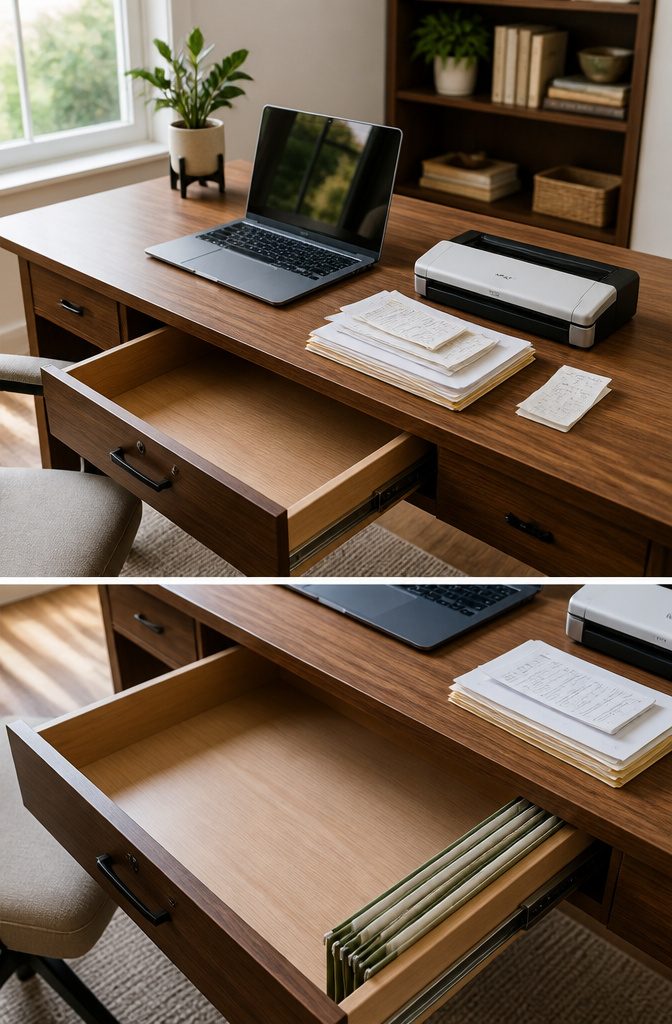
Paper still takes up more space than it should. I scan documents I need to keep but rarely touch — tax records, old contracts, receipts worth holding onto — and store them digitally.
The drawer space comes back fast, and finding something later is easier when you can search by name instead of flipping through labeled folders.
I moved my calendar and to-do list to my phone a few years back and synced them across devices.
Reminders fire when I need them, not when I happen to glance at a sticky note. The memo pad went digital too, which cleared out the small scraps of paper that used to collect at the edge of the desk.
Your computer desktop counts as clutter. I sort icons into folders that match how I actually work, and once a week I file away anything taking up space or sitting where it does not belong.
It cuts down on the visual mess when you open the laptop.
Physical files still matter for anything you access often or are required to keep in hard copy. Those go in a filing system within reach, sorted by how often you need them and labeled so you are not guessing.
7. Manage Cables and Cords
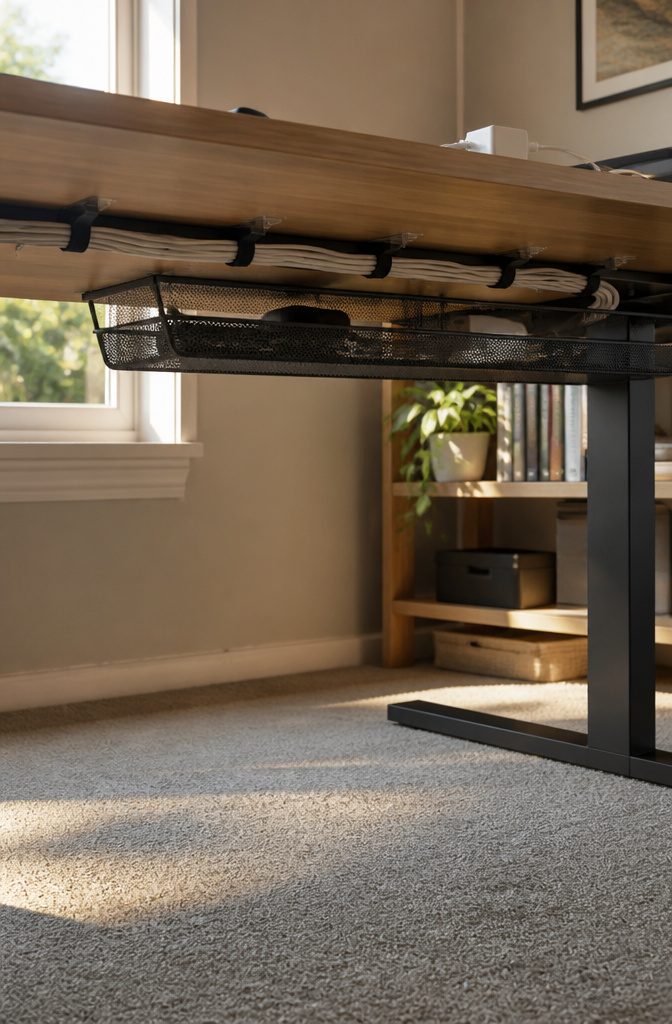
Cables bunch, tangle, and drape across the back edge of the desk the moment you plug in more than two things.
Bundling them together with rubber bands, zip ties, or twist ties stops the spaghetti look and keeps individual cords from sliding to the floor every time you unplug a charger.
Space the ties a few inches apart if the cables are long, then stick the whole bundle to the back of the desk with adhesive clips so they stay put.
The Cinati 16-inch Cable Management Tray mounts under the desk with clamps instead of screws, which matters if you rent. It fits desk thicknesses from 0.4 to 3 inches and hides the power strip and every cable that feeds into it.
The desktop goes from five visible cords to zero. Velcro wraps work the same way for less money and keep tangles out of your legroom, though they won’t hide the cables completely.
8. Keep the Working Surface Clear and Arrange Essentials for Access

The 18 inches directly in front of you is the only part of the desk that matters every hour.
Everything you touch more than once a day belongs there — keyboard, mouse, current notebook, pen — and nothing else. The rule is 10 items maximum.
Count what sits in that zone right now. If you’re past 10, something doesn’t belong.
A standard desk runs 24 to 30 inches deep and 48 to 60 inches wide, roughly 10 square feet of surface. Without a hard limit on what goes where, that space fills in under a week.
One cable. One sticky note.
One piece of mail. By Friday the clear desk from Monday is buried, not because you’re undisciplined but because a flat surface with no boundaries will always accumulate until it’s covered.
What stays out: computer, writing tools, planner or to-do list, phone charger, lamp, and one or two personal touches. Action files sit on the desk only if you use them daily.
Everything else — manuals, binders, supplies you reach for twice a month — goes in a drawer or on a nearby shelf where it’s still accessible but off the working surface.
9. Use Monitor Stands or Risers to Gain Space
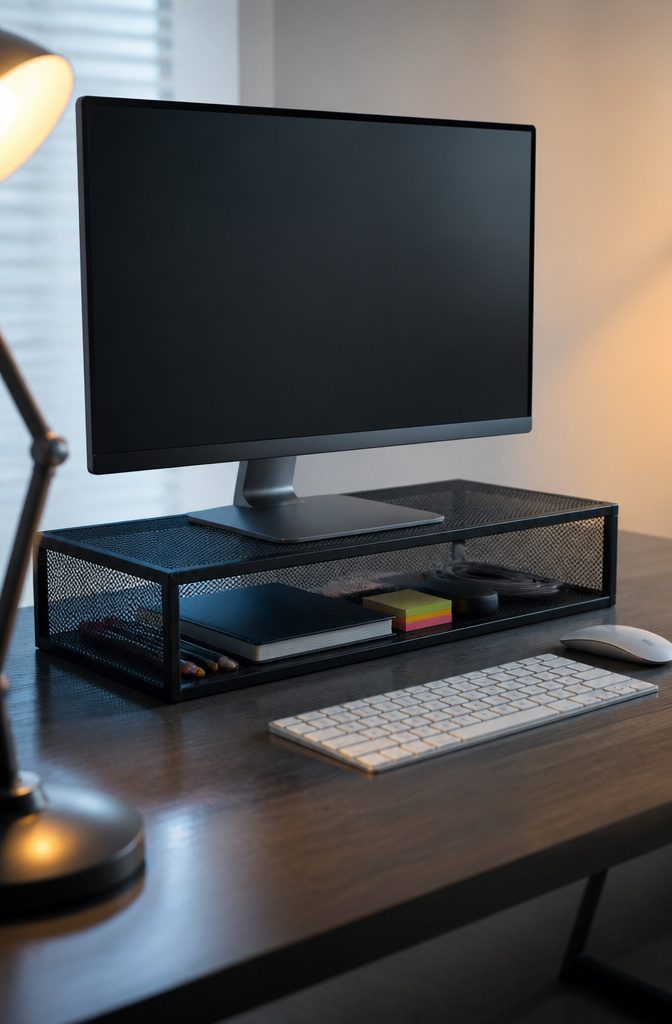
Raising the screen frees the surface underneath it. A monitor riser lifts your display to eye level and creates storage for supplies you reach for constantly: pens, a notebook, sticky notes, charging cables.
The WALI STT005-B Metal Mesh Monitor Riser measures 23.6 by 9 inches and supports monitors up to 27 inches.
It adds 4.3 inches of height, which works for most setups but can push the screen too high if your chair sits low or doesn’t adjust.
Before you buy one, check your posture at the desk. The top of the monitor should sit at eye level, and your elbows should hit a 90-degree angle when your hands rest on the keyboard.
If the riser puts the screen above that, you’ll end up tilting your head back all day.
Measure the gap between your current screen height and eye level first. A riser that lands you in the right position clears the desk and fixes your neck angle at the same time.
10. Limit and Deliberately Place Personal Items

A plant or a framed print feels like intentional design.
Five coffee mugs, a stack of unopened mail, and a drift of receipts reads as clutter. Keeping two or three items in view works if they are things you chose, not things that landed there.
A photo you love or a succulent you water can stay. The ticket stub from last year’s concert and the charger for a phone you do not own anymore cannot.
Plants pull double duty.
A small potted fern or a spider plant on the corner of the desk adds something living to the space, and the productivity boost some studies put at fifteen percent comes from having something green to glance at during long stretches of work.
The caveat is that a dead plant does the opposite, so if you forget to water things for weeks at a time, skip it.
Functional pieces count less heavily. A pen cup or a desk lamp are tools, not decorations, and they do not eat into the two-item allowance the way a ceramic penguin does.
The line to watch is whether the object serves the work or whether it just occupies space.
11. Build a Regular Cleanup and Review Habit
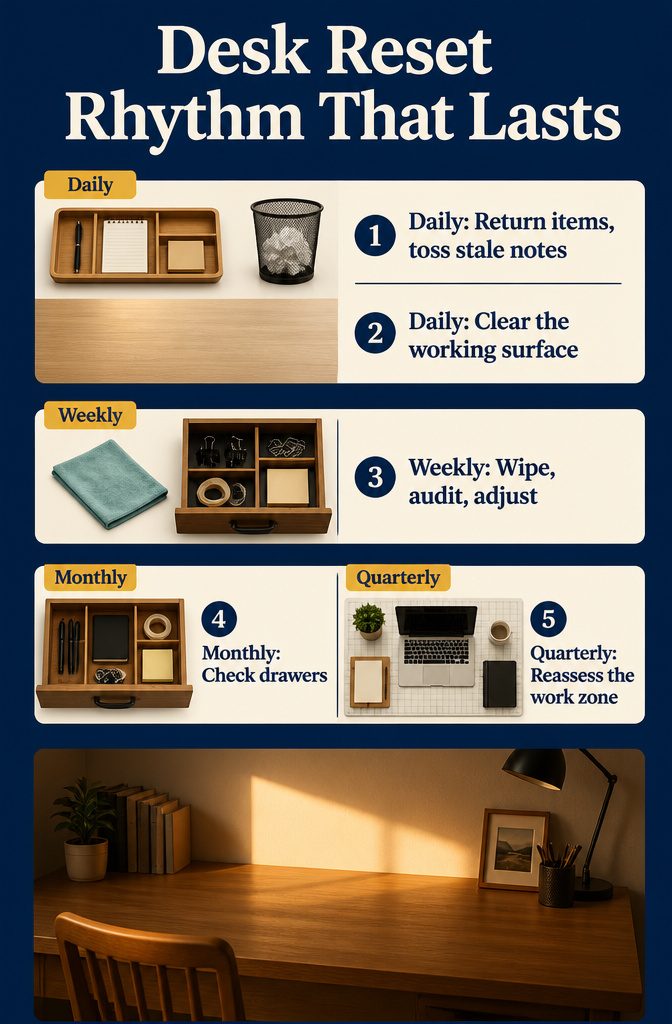
The five-minute reset at the end of each day is the habit that decides whether a system actually works.
Return items to their designated spots, toss the note that is no longer relevant, and clear the working surface before you walk away. That daily reset keeps clutter from piling up faster than you can deal with it.
A weekly session goes deeper. Fifteen to thirty minutes is enough to wipe surfaces, audit what has accumulated in the drawers, and adjust anything that stopped working.
I run through the desk once a week and catch things before they become the kind of mess that takes an afternoon to undo.
Monthly drawer checks and quarterly reassessments of the primary work zone keep the system aligned with what you are actually doing.
A drawer that made sense in January may be full of supplies you have not touched by April, and reallocating that space takes less effort than working around dead storage.
The pattern is the same at every interval: return, clear, adjust.
12. Use Organizers That Fit the Items and the Person’s Work Style
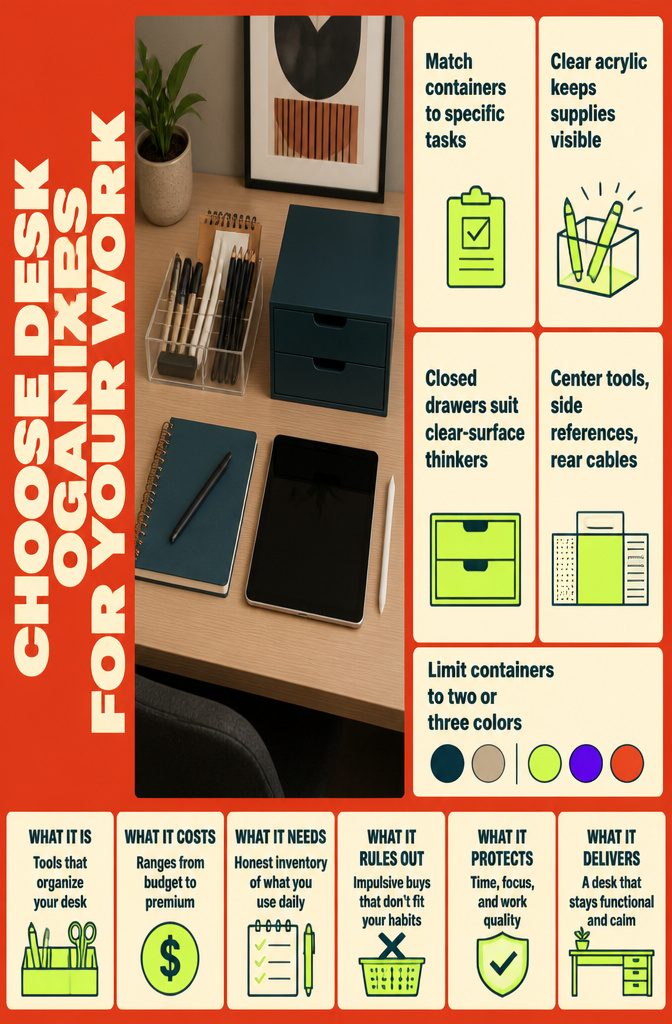
The right organizers depend on the work actually done at the desk and how someone naturally keeps track of things.
A desk used for client calls needs room for a notebook or tablet within arm’s reach and a place to charge devices between meetings, while someone doing illustration work keeps drawing tools sorted by type and reference images nearby.
Choosing containers around specific tasks prevents buying trays that end up empty or overloaded because they do not match what the desk holds.
People organize in different ways, and the setup has to fit that or it will not last.
Someone who thinks visually might keep supplies in clear acrylic so everything is in sight, while another person works better with closed drawers and a clear surface.
The desk can be split into zones based on frequency: primary tools in the center zone, reference materials off to one side, cables and chargers in a back corner, and anything personal placed where it does not crowd the working area.
Stick to two or three colors across the containers so the desk looks intentional rather than pieced together from whatever was on sale.
How Disorganization Costs Time
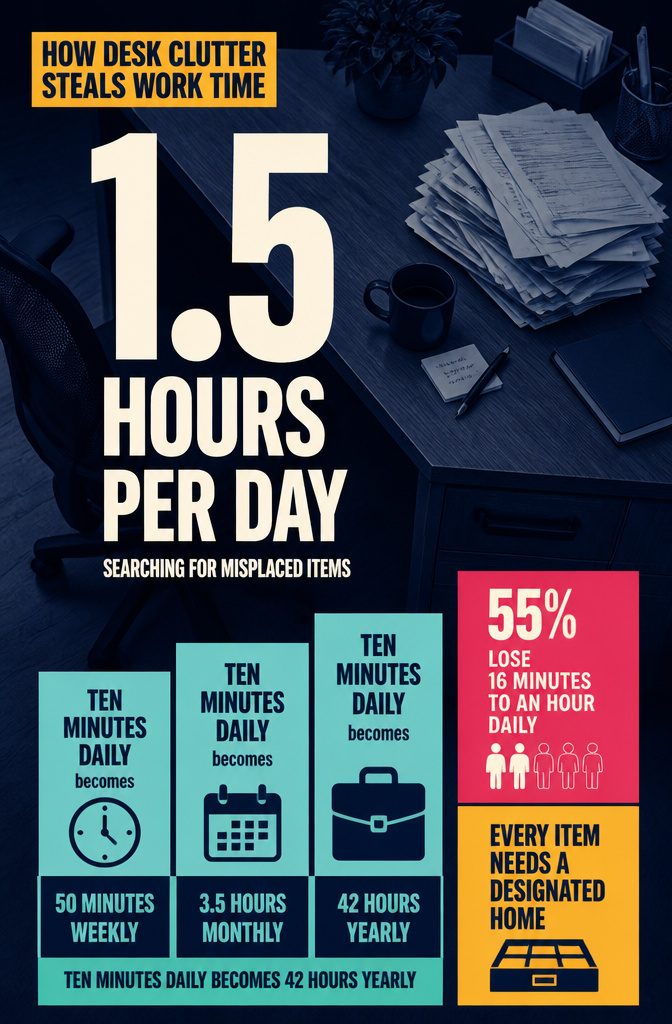
The average office worker spends 1.5 hours per day searching for misplaced items—that’s 7.5 hours per week, nearly an entire workday gone.
Another way to look at it: ten minutes of daily searching adds up to 50 minutes weekly, 3.5 hours monthly, and 42 hours yearly. That’s a full week of work lost annually to hunting down things that don’t have a fixed spot.
The National Association of Productivity and Organizing Professionals found that 55 percent of consumers say disorganization costs them 16 minutes to an hour every day.
On a desk, that lost time is mostly spent looking for things that don’t have a designated home.
Paper piles grow because there’s no triage point, and every piece that arrives sits on the surface until you deal with it or it gets buried.
The fix isn’t tidying more often—it’s giving every category of item a home and a rule for when it’s full.
What Stays on Top and What Goes Inside
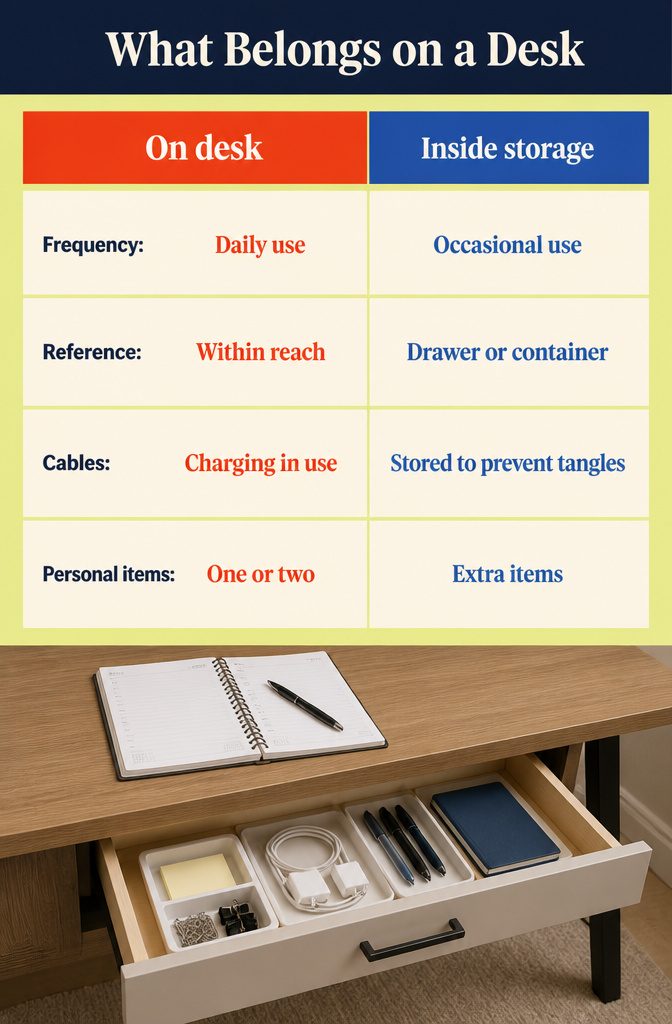
The computer, your daily planner, and whatever you write with belong on the desk surface. Those earn their place by getting touched multiple times a day.
A lamp stays out, your phone charger stays out, and action files that hold anything you need to tackle this week stay within reach. One or two personal items make the space yours without swallowing it.
Everything else should live in a drawer or storage container:
- Reference materials you open once a month or less
- Office supplies you reach for occasionally but not daily
- Cables and cords that tangle the moment you look away
- Sensitive documents that need a locked drawer
- Extra gadgets like a backup keyboard or tablet you pulled out of rotation
- Project materials for anything that is not this week’s work
- The extra personal items that tip the desk from intentional to cluttered
A surface that holds only what you use daily resets faster and gives you room to actually work.
Frequently Asked Questions
How do I declutter a desk that’s completely covered in stuff?
Pull everything off the surface first, then sort into three piles: stays on the desk, belongs elsewhere, and trash.
The stays pile should be small, limited to items you touch at least once a day. Most items that hesitate at the 90-second decision mark belong in the elsewhere pile.
What should I keep on my desk?
Keep only what you touch more than once a day: computer, writing tools, planner or to-do list, phone charger, lamp, and one or two personal touches.
The working surface should hold a maximum of 10 items. Action files sit on the desk only if you use them daily.
What should I stash in drawers or storage containers?
Drawers should hold reference materials you open monthly or less, office supplies you reach for occasionally, cables and cords, sensitive documents, extra gadgets, project materials for work that is not this week’s priority, and excess personal items.
A surface that holds only daily-use items resets faster.
How do I keep my desk organized every day?
Run a 5-minute reset at the end of each day: return items to their designated spots, toss notes that are no longer relevant, and clear the working surface before you walk away.
That daily reset keeps clutter from piling up faster than you can deal with it.
How do I organize a small desk with too much stuff?
Move supplies off the desk and onto the walls with file holders, pegboards, and floating shelves.
A monitor riser frees the surface underneath for supplies you reach for constantly. Then apply the three-pile sort to remove anything not touched daily.
Does a clean desk actually improve productivity?
The average office worker spends 1.5 hours per day searching for misplaced items, which adds up to 42 hours yearly.
Giving every category of item a home cuts down on searching and visual distraction, reclaiming time lost to hunting down things that do not have a fixed spot.
What desktop tools or accessories would specialists recommend to maximize effective desk space?
Use divided drawer organizers like the Marbrasse Bamboo Expandable Drawer Organizer with 10 compartments, cable management trays like the Cinati 16-inch tray that mounts under the desk, and monitor risers like the WALI STT005-B that lift the screen and create storage underneath.
Small trays and pegboards with rearrangeable hooks keep supplies accessible without eating up desk real estate.
What are the four main organizing styles?
Visual organizers need to see items and work best with open shelving and clear containers. Minimalist organizers prefer clean surfaces with hidden storage and digital systems.
Functional organizers prioritize efficiency and arrange items based on frequency of use. The right system depends on whether you work better with everything in sight or stress-free surfaces.